Build complete web applications in just a few minutes, when traditional development can take weeks. Thanks to Bolt.new, this is now possible. This game-changing tool acts as your virtual development partner, capable of generating code from your simple instructions.
Bolt.new is a code editor built into your browser and powered by artificial intelligence. This innovative solution helps you create professional, elegant websites in just a few clicks, while using AI to develop SAAS products, websites, programs, and plugins. In this complete guide, you'll discover how Bolt works, its main features, and how to use it effectively even if you're just starting out in web development.
What is Bolt.new and who is it for?
Bolt.new is an innovative platform in the world of web development. Let's discover together what it offers and who it's really meant for.
A simple definition of Bolt.new
Bolt.new is an online code editor powered by artificial intelligence that lets you build complete web applications without necessarily mastering programming. Its principle is remarkably simple: you describe in natural language what you want to build, and Bolt AI automatically generates the corresponding code. This game-changing approach radically transforms the development process by making it accessible to everyone.
Unlike traditional development environments that require deep knowledge of programming languages, Bolt code translates your ideas into functional lines of code for both the frontend and backend of your application.
Target audience: beginners, freelancers, startups
If you're wondering "what is Bolt", know that it primarily targets three categories of users:
- Beginners: Even without any programming experience, you can create functional and professional web applications.
- Freelancers: This tool helps you significantly speed up your client projects, reducing delivery times while maintaining professional quality.
- Startups: For young companies looking to quickly develop an MVP (Minimum Viable Product), Bolt app offers an economical and effective solution.
The platform simplifies every step of development, from design to deployment, making web application creation accessible at all skill levels.
Why choose Bolt over another tool?
Faced with the many alternatives to Bolt new, several advantages set this platform apart:
First, its learning curve is practically nonexistent. Where other tools require weeks of training, how Bolt works can be understood in just a few minutes thanks to its intuitive interface.
Second, the development speed is unmatched. Projects that would normally take weeks can be completed in just a few hours, or even minutes.
Finally, Bolt's flexibility lets you build varied web applications, from showcase websites to e-commerce platforms, including internal management apps. The tool adapts to your specific needs without locking you into rigid templates.
In addition, the free Bolt new plan lets you test the platform before committing financially, ideal for evaluating whether the tool matches your expectations.
How does Bolt.new work?
To understand Bolt.new, you first need to grasp how it works based on artificial intelligence. Let's explore together the mechanisms that make this tool a revolution in web development.
How Bolt works: the principle of prompts
The heart of how Bolt works rests on a system of prompts, instructions you write in natural language. Instead of coding manually, you simply explain what you want to create, and Bolt AI translates your requests into functional code.
To get the best results, Bolt new offers a prompt enhancement feature:
- Write your request in the chat area
- Click on "Enhance prompt"
- Bolt then generates an improved version of your request
The platform also has a library of preset prompts you can use as a starting point. This feature lets you save time by reusing effective prompts.
The user interface explained simply
The Bolt new interface is made up of three main elements:
First, the code editor where you view and modify the generated code. You can target specific files by right-clicking to tell Bolt where to focus its changes.
Next, the chat area where you communicate with the AI. This is where you enter your prompts and receive responses from the assistant.
Finally, the preview that lets you see your application in real time. The "Inspector" tool even lets you click on any element to modify it through a prompt.
Bolt code: a look at the automatically generated code
Bolt code uses diff-based editing to precisely modify the necessary parts of the code. This approach significantly increases token efficiency and the accuracy of modifications.
Furthermore, Bolt new generates complete full-stack code, supporting both frontend and backend. The code produced is immediately functional, letting you test your application directly in the browser without any additional configuration.
In case of errors, Bolt AI can identify and fix them on request. However, it is recommended to break complex requests into small steps to get optimal results and make problem solving easier.
Main features of Bolt.new
Let's now explore the features that make Bolt.new such a powerful tool for web development. These distinctive characteristics radically transform the traditional approach to coding.
AI-powered code generation
At the core of Bolt AI is its ability to turn your text instructions into functional code. Unlike traditional tools, Bolt code lets you describe what you want to build in natural language. So, a simple sentence like "build me a React app with a responsive navigation bar" is enough to generate the necessary files. In case of errors, the assistant can identify and fix them automatically on request, saving you hours of debugging.
Intuitive and online interface
Bolt new runs entirely in your browser, with no local installation required. Its clean interface divides your screen into two distinct areas: on the left, your dialogue space with the AI, and on the right, the generated code with its real-time preview. This minimalist approach lets you focus on your project without being overwhelmed by complex menus.
Full-stack support: frontend, backend, database
Bolt app excels at building complete applications thanks to its multi-technology support. The platform supports popular frameworks like React, Vite, Next.js, Astro, and Svelte on the frontend side. It also lets you set up a complete Node.js backend with Express. This versatility turns your browser into a true all-in-one development ecosystem.
Fast deployment with Netlify or Firebase
Getting your projects online has never been easier thanks to the native integration with Netlify. Bolt new lets you deploy your application in just a few clicks. Once deployed, your application instantly receives a public URL that you can share right away. This feature eliminates the complex configurations usually needed to deploy web applications.
Integration with GitHub and Supabase
To round out its arsenal, Bolt new integrates seamlessly with GitHub for version control and Supabase for advanced backend features. Notably, Supabase provides a hosted SQL database, authentication services for user management, and edge functions to build APIs. This integration lets you construct complete applications with authentication, data storage, and even payment processing via services like Stripe.
Building your first application with Bolt.new
Let's now get hands-on with Bolt new. Follow this step-by-step guide to build your first application quickly and effectively.
Step 1: Sign up and access Bolt app
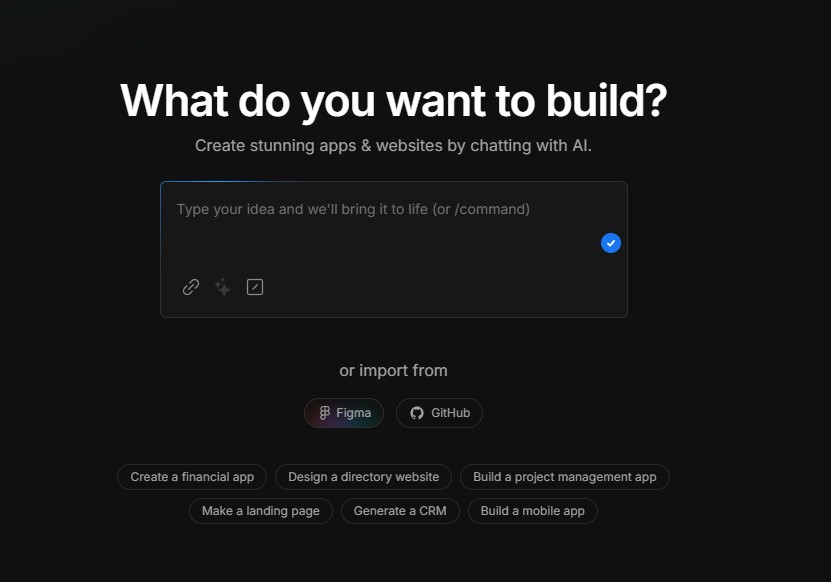
To begin your journey with Bolt app, head to the official site and create your account. No installation is required since the platform runs entirely in your browser. Bolt new offers a free version that lets you test the tool before committing. Once logged in, you'll see the main interface with a chat area to communicate with the AI.
Step 2: Write an effective prompt
The key to success with Bolt AI lies in the quality of your prompts. Before starting, think about:
- What you want to build
- Who will use your application
- Which features it should include
- What visual style you prefer
To optimize your results, use the "Enhance prompt" feature that automatically improves your instructions. For example, a simple "Build me a blog" can be transformed into a detailed description including structure, technologies, and design.
Step 3: Customize the generated interface
After your application is generated, Bolt code lets you customize every aspect. You can target specific files by right-clicking and selecting "Target file". The visual editor also gives you the ability to modify the interface by simply clicking on the elements you want to change.
Step 4: Test and fix errors
During development, proceed in small steps: add a feature, test it, then move on to the next. In case of errors, what is Bolt really shines. Use Discussion mode to analyze problems without consuming too many tokens. For complex projects, don't hesitate to use the npx knip command to clean up unused files and optimize performance.
Step 5: Deploy your project
How Bolt works also includes deployment. Simply click the "Deploy" button at the top right of the interface. Bolt new integrates seamlessly with Netlify, letting you publish your application in one click and instantly get a public URL. You can then transfer ownership of the site to your Netlify account and even link your project to GitHub for effective version control.
Advantages, limitations, and alternatives to Bolt.new
After exploring the features of Bolt.new, let's now look at its strengths, weaknesses, and the alternatives available on the market.
The strengths of Bolt AI
Bolt AI stands out mainly for its impressive development speed. Projects that would normally take weeks can be completed in just a few minutes, making it a valuable tool for rapid prototyping. According to some testimonials, one founder built an AI-integrated CRM with billing in just 3 weeks for €286.26.
In addition, Bolt new significantly lowers the entry barrier for non-developers. If you can describe what you want in English, you can probably get a functional application without prior technical knowledge.
Limitations to be aware of (design, complexity)
However, Bolt code has some limitations. The AI struggles with complex interface customizations, particularly with specific design systems or custom animations. Furthermore, token consumption becomes problematic for large projects, with some users having lost 1.3 million tokens in a single day.
For complex applications, Bolt generally delivers 80% of the result quickly, but the remaining 20% may require considerable manual effort.
Bolt reviews: what users are saying
Bolt reviews are mixed. On one hand, many users appreciate its ability to quickly turn prompts into functional applications. On the other hand, some report that the tool sometimes rewrites entire components for small changes, which wastes tokens and can break the code.
Free Bolt.new vs paid version
Free Bolt new offers 150,000 tokens per day and 1 million per month. Paid plans start at €19.08 for 10 million tokens monthly (Pro), up to €95.42 for 50 million (Pro 100). Note that tokens do not roll over from one month to the next, but additional purchased tokens are kept as long as you remain subscribed.
Bolt.new alternative: what similar options exist?
If Bolt new doesn't meet your needs, several alternatives exist:
- UI Bakery: Ideal for applications connected to APIs or databases
- OpenBolt.dev: Open-source version inspired by Bolt.new
- Lovable: Focused on user experience and emotional design
- Bubble: Better suited for complex web applications with rich features
Conclusion
Bolt.new undoubtedly represents a significant advance in the field of web development. This platform radically transforms how you can build applications, even without prior technical skills. Its ability to translate your natural-language instructions into functional code makes development accessible to a much wider audience.
Of course, Bolt has some limitations, particularly for complex designs and large projects that consume many tokens. Nevertheless, its advantages generally outweigh these drawbacks, especially for beginners, freelancers, and startups looking to quickly develop their ideas.
The intuitive interface, full-stack support, and integration with services like GitHub, Netlify, and Supabase make Bolt.new a complete tool for your web projects. Whether you want to build a simple showcase site or a more complex application, this platform lets you reach your goals in record time.
Before getting started, evaluate your specific needs to determine whether the free version is enough or whether a paid subscription would be more appropriate. Also keep in mind that for certain complex projects, you may need to complete the work manually for the finishing touches.
Ultimately, Bolt.new perfectly illustrates how artificial intelligence is revolutionizing web development. This democratization of digital creation tools opens the door to a new era where your ideas can materialize quickly, without the traditional technical obstacles.
Key Takeaways
Discover how Bolt.new revolutionizes web development by allowing anyone to build complete applications without prior technical skills.
• Bolt.new turns your ideas into code: Simply describe what you want in English, and the AI automatically generates the corresponding frontend and backend code.
• Ultra-fast development: Build complete web applications in minutes instead of weeks, ideal for rapidly prototyping and testing your ideas.
• Accessible to beginners: No programming knowledge required. The intuitive interface and natural-language prompts are enough to get started.
• Complete integrated solution: Full-stack support with one-click deployment via Netlify, GitHub integration, and Supabase database included.
• Watch out for limitations: High token consumption for complex projects and difficulties with highly customized designs. Evaluate your needs before getting started.
This AI revolution in web development opens up new possibilities for entrepreneurs, freelancers, and creators who want to bring their digital projects to life without technical barriers.
FAQs
Q1. How does Bolt.new work to build web applications? Bolt.new uses artificial intelligence to turn your natural-language instructions into functional code. You simply describe what you want to build, and the tool automatically generates the corresponding frontend and backend code.
Q2. What are the advantages of Bolt.new for development beginners? Bolt.new makes web development accessible to beginners by eliminating the need for deep technical knowledge. Its intuitive interface and prompt system let you build functional applications quickly, without having to code manually.
Q3. Is Bolt.new free or paid? Bolt.new offers a free version providing 150,000 tokens per day and 1 million per month. Paid plans are also available, starting at €19.08 for 10 million tokens monthly, for those who need more resources.
Q4. What are the main features of Bolt.new? Bolt.new offers AI-powered code generation, an intuitive online interface, full-stack support (frontend, backend, database), fast deployment via Netlify or Firebase, and integration with GitHub and Supabase.
Q5. What are the limitations of Bolt.new? Bolt.new can struggle with complex interface customizations and highly specific designs. Furthermore, large projects can consume many tokens, which can become costly. For some complex applications, manual intervention may be necessary to finalize the project.